
On-Page SEO: Optimise What Happens on the Page.
Learn how to optimise titles, meta descriptions, headings, content, images, links and page structure so search engines and users can better understand your content.
What is On-Page SEO?
On-Page SEO is the process of improving elements within a webpage to make its topic, purpose and content easier for both users and search engines to understand.
For example, imagine a bakery has a page about birthday cake delivery in Kuala Lumpur. The page should clearly communicate that topic through its title, headings, content, images, links and overall structure.
On-Page SEO is not about placing the same keyword everywhere. It is about creating a useful page that satisfies the searcher's intent while making the page's subject clear.
What can you optimise on a webpage?
On-Page SEO involves multiple elements that work together to communicate the meaning and usefulness of a page.
Search Intent
Make sure the page actually answers what the searcher is trying to find.
Title Tag
Create a descriptive title that clearly communicates the main topic.
Meta Description
Write a useful search snippet that encourages relevant users to visit.
URL
Use a simple and descriptive URL structure where possible.
Headings
Organise the page using a logical H1, H2 and H3 structure.
Content
Provide useful, original and relevant information that satisfies search intent.
Images
Optimise filenames, alt text, file size and relevance.
Links
Connect useful internal pages and relevant external sources.
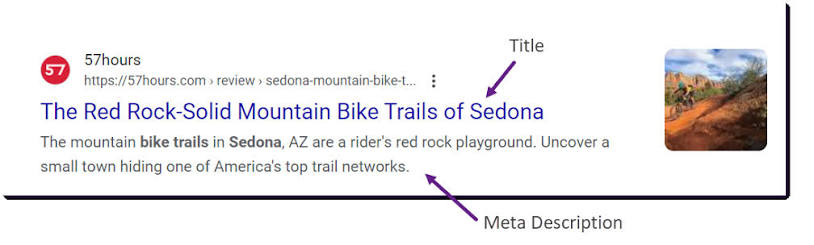
Title Tag & Meta Description
The title tag helps describe the main topic of a webpage and commonly appears as the clickable title in search results.
The meta description provides a short description of the page. It is not a direct ranking factor, but a clear and relevant description can help users understand what the page offers.
SEO-Friendly URL Structure
A URL should help users and search engines understand where a page sits and what it is about.
Simple, descriptive URLs are generally easier to read, share and maintain than long URLs containing unnecessary numbers or parameters.
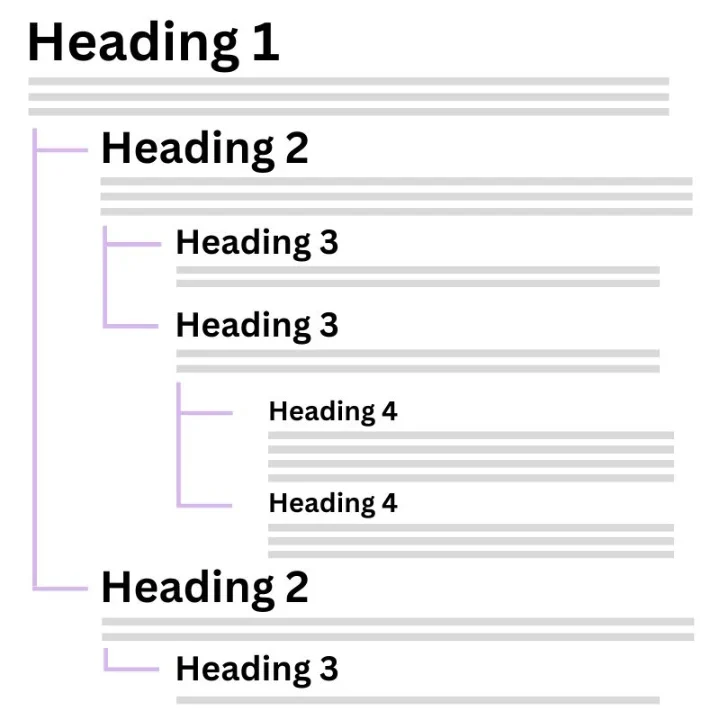
H1, H2 & H3 Heading Structure
Headings organise information into sections and make long pages easier to scan and understand.
The H1 normally represents the main topic of the page. H2 headings divide the page into major sections, while H3 headings can divide those sections into smaller topics.
Content SEO: create content that deserves to rank.
Search engines do not need another page that simply repeats keywords. Your content should help the searcher complete the task that brought them to the page.
Match Search Intent
Understand whether users want to learn, compare, find a location, buy or complete another action.
Answer the Main Question
Do not hide the answer behind unnecessary introductions. Give users the information they came for.
Cover the Topic Properly
Include the useful subtopics a visitor reasonably needs to understand before making a decision.
Use Clear Language
Write for the intended audience instead of making content complicated purely to sound authoritative.
Add Original Value
Use genuine examples, expertise, images, data, experience or insights where appropriate.
Keep Content Useful
Update pages when important information becomes outdated or no longer serves the user.
Where should keywords appear?
Once you know the primary topic and related keywords, use them naturally where they help describe the content.
Useful Places
Don't Force It
Image SEO
Images can improve the usefulness and visual quality of a page, but they should also be descriptive, accessible and efficient.
Use a meaningful filename where practical instead of IMG_839281.jpg.
Describe the image's purpose or content when an alt description is appropriate.
Compress unnecessarily large images to reduce the amount of data visitors need to download.
Use images that actually support the surrounding content instead of adding visuals purely for decoration.
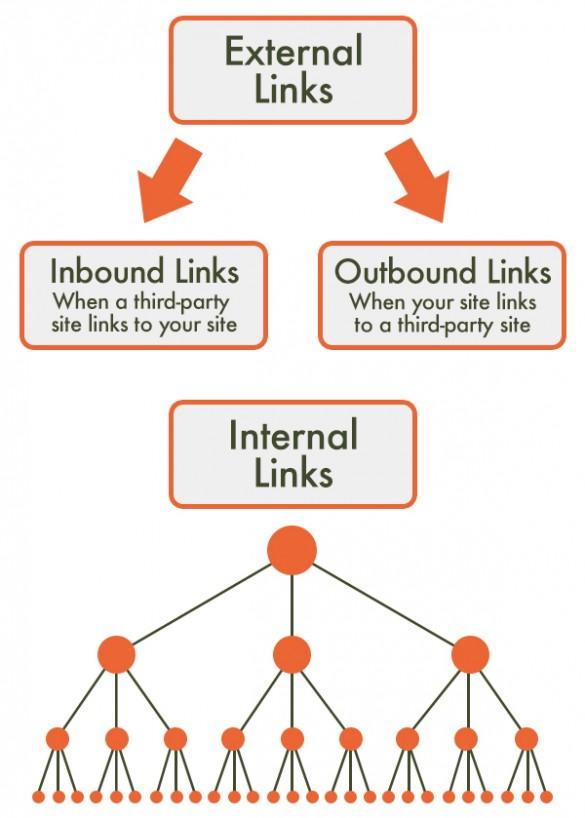
Internal & External Links
Links help users move between useful resources and help search engines discover relationships between pages.
Internal Links
An internal link points from one page on your website to another page on the same website.
Example: A blog about choosing a birthday cake could link to the bakery's Birthday Cake Delivery page.
External Links
An external link points to another website. Use external sources when they genuinely help support or expand the information provided to readers.
Descriptive Anchor Text
The clickable text should provide context about the page users will visit instead of relying on generic wording such as “click here” everywhere.
Show users why they should trust the content.
For topics where trust matters, demonstrate genuine experience, expertise and transparency instead of publishing anonymous, generic content with little supporting value.
Experience
Where useful, show genuine first-hand experience with the subject being discussed.
Expertise
Provide accurate and useful information appropriate to the subject and audience.
Authority
Build a strong reputation around the topic through quality content, recognition and references.
Trust
Make it clear who operates the website, how to contact them and where important information comes from.
How to do On-Page SEO step by step.
Use this workflow whenever you create a new page or optimise an existing one.
Choose the Page's Main Keyword
Identify the primary keyword and related keyword cluster that best represents the page.
Check Search Intent
Search the keyword and understand what users expect: an article, service page, product, category, comparison, local result or another page type.
Review Existing Search Results
Study the topics, formats and questions covered by useful pages already appearing for the search.
Create the Page Structure
Plan the H1, H2 and H3 sections before writing so the page follows a clear logical flow.
Write Useful Content
Answer the main search intent, cover relevant subtopics and provide useful information rather than writing to reach an arbitrary word count.
Optimise Title & Meta Description
Write a clear title and search description that accurately communicate what users will find on the page.
Optimise Images
Use appropriate file names, descriptive alt text where needed and compressed image files.
Add Internal Links
Connect the page to other useful pages on your website using descriptive and relevant anchor text.
Add Useful External Sources
Where appropriate, link to authoritative sources that help readers verify or better understand information.
Review the Page as a User
Check readability, layout, mobile usability, calls to action and whether the page genuinely satisfies the original search.
Weak On-Page SEO vs better On-Page SEO.
✕ Weak Page
TitleCake | Cake Shop | Best Cake | Buy Cake
H1Welcome to Our Website
ContentVery little information about products, delivery, sizes, flavours or ordering.
Internal LinksNo links to relevant cake categories or ordering pages.
ImagesIMG_29382.jpg with no useful description.
✓ Better Page
TitleBirthday Cake Delivery in Kuala Lumpur | Example Bakery
H1Birthday Cake Delivery in Kuala Lumpur
ContentExplains available cake types, sizes, flavours, customisation, delivery areas and ordering process.
Internal LinksLinks naturally to custom cakes, delivery information and contact or ordering pages.
ImagesDescriptive images with appropriate filenames, alt text and optimised file sizes.
Before publishing your page.
Run through this simple checklist before hitting publish.
On-Page SEO Quiz
Answer all five questions and check your score.