
Google Discover can send a wave of visitors to your website without anyone typing a single search. That sounds like magic. However, it is not luck. In fact, Google Discover follows clear rules, and most Malaysian businesses simply ignore them.
So in this guide, I’ll explain how Google Discover works and what changed in 2026. Then I’ll show you how to get into the feed. You’ll also get nine practical steps you can start on this week.
What Is Google Discover?
Google Discover is a personalised content feed from Google. It shows articles, videos and other content based on each user’s interests. Most people see it inside the Google app on their phone.
Here’s the key difference. With normal search, a person types a query first. With Discover, Google suggests content before the person asks for anything. In other words, Google tries to predict what you want to read next.
For example, a Shah Alam homeowner who reads about renovation might see a new post on kitchen design. They never searched for it. Instead, Google matched the article to their interests.
How Google Discover Is Different From Google Search
According to Google Search Central, Discover uses many of the same signals and systems as Search. So good SEO habits still matter here. That said, a few things work very differently.

First, there are no keywords to target. Google picks content for each user, so you can’t “rank” for a phrase in the feed. Second, traffic tends to come in bursts. A post might get thousands of visits in two days and then slow down.
Third, visuals carry more weight. Every card in the feed shows an image, a title and your site name. As a result, a weak image or a dull headline can cost you the click.
Finally, you can’t apply or pay to join the organic feed. Google says content is automatically eligible if it is indexed and meets Discover’s content policies. No special tags or structured data are needed. However, being eligible does not guarantee that Google will show your content.
What the February 2026 Discover Core Update Changed
In February 2026, Google released its first core update made only for Discover. According to Search Engine Land, the rollout began on 5 February and finished 21 days later.
Google said the update aims to do three things:
- Show more locally relevant content from websites based in the user’s country.
- Reduce sensational content and clickbait.
- Highlight more in-depth, original and timely content from sites with real expertise in a topic.
At first, the update applied only to English-language users in the United States. However, Google said it would expand to all countries and languages in the coming months. You can read the official note on the Google Search Central Blog.
For Malaysian websites, this is good news. If Google favours sites from the user’s own country, then local businesses have a real edge over foreign sites. That’s why now is a smart time to prepare.
Why Google Discover Matters for Malaysian Businesses
Many of your customers reach for their phone first. So a mobile feed that pushes your content to interested readers is a big opportunity. Better still, you don’t pay for each click like you do with ads.
Google Discover also helps people find you before they know your brand. For instance, a bakery in Penang could reach food lovers who never searched for “bakery Penang”. Similarly, a law firm could reach readers who follow news about property or family law.
Of course, Discover should not replace your main SEO plan. Search traffic is steadier and easier to predict. Think of Discover as a bonus channel that rewards the same quality work.
9 Ways to Get Your Content Into Google Discover
Now let’s get practical. These nine steps come from Google’s own advice and from what we see when we audit client websites.
1. Make Sure Google Can Index Your Pages
Discover can only show pages that Google has indexed. So start with the basics. Check that your posts are not blocked by robots.txt or a stray noindex tag.
Next, submit your sitemap and use the URL Inspection tool. If you’re new to it, our Search Console setup guide walks you through each step.
2. Use Large, High-Quality Images
Images can make or break your Discover cards. Google recommends images that are at least 1,200 pixels wide. It also suggests a 16:9 ratio where possible.
In addition, you must allow large previews. You can do this with the max-image-preview:large robots setting. Most SEO plugins, including Yoast, turn this on by default. Still, it’s worth checking your page source.
Also, avoid using your logo as the main image. Instead, pick a relevant photo that shows what the article is about. Google also advises against images with lots of text.
3. Write Honest, Clear Titles
Clickbait might win a click today. However, it will hurt you in Discover over time. Google warns against titles that tease, exaggerate or hold back key details.
So write titles that sum up the content. For example, “5 Mistakes That Delay Your SSM Registration” works better than “You Won’t Believe What Happened Next”. The first one sets a clear promise, and the article can keep it.
4. Publish Timely and Original Content
Discover loves fresh, useful content. That includes news about your industry, seasonal guides and new insights. For example, a travel agency could publish school holiday tips a few weeks before the holidays start.
Original content matters too. If your post only repeats what ten other sites said, Google has little reason to pick it. Instead, add your own data, photos, client examples or expert opinion.
5. Build Expertise in One Topic
The 2026 update rewards sites with clear expertise in a topic. In practice, this means you should go deep, not wide. A clinic that writes 30 helpful posts about dental care will look more trusted than one that writes about everything.
You can also show expertise with author bios, real credentials and honest sources. Our E-E-A-T guide explains how to build that trust step by step.
6. Show That You Are a Local Business
Because Google now wants locally relevant content, make your Malaysian roots obvious. Mention the cities you serve. Use local examples, local prices in ringgit and local events.
Also, keep your business details consistent across your website and Google Business Profile. Together, these signals help Google understand where you are and who you serve.
7. Improve Mobile Page Experience
Discover is mainly a mobile feed. So your pages must load fast and read well on a small screen. Google lists a good page experience as one of its Discover recommendations.
For instance, remove intrusive pop-ups, compress images and use a clean, readable layout. If your site still feels slow, our mobile SEO guide walks you through seven practical steps.
8. Set a Strong og:image and Article Schema
Google can use your schema.org primary image or your og:image tag to choose a large preview. Therefore, set a clear featured image for every post. In WordPress, Yoast and most SEO plugins add these tags for you.
Article structured data is not required for Discover. Even so, it helps Google understand your content, author and publish date. So it’s a good habit for any blog.
9. Track Your Results in Search Console
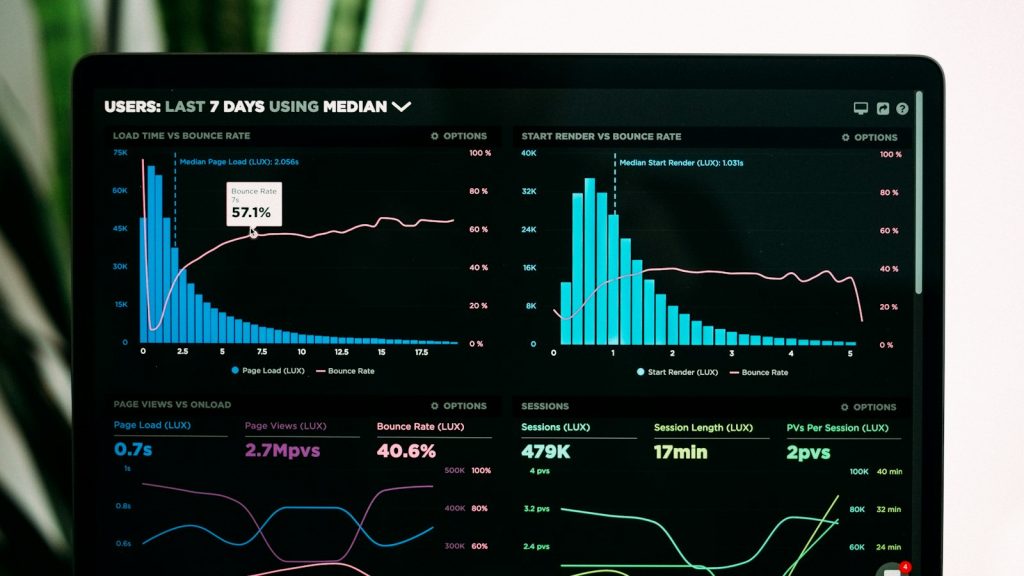
Finally, measure what works. Google Search Console has a separate Discover performance report. It shows impressions, clicks and click-through rate for the last 16 months.
However, the report only appears once your site reaches a minimum number of impressions. So don’t worry if you can’t see it yet. Keep publishing, then check back every few weeks.
When data arrives, look for patterns. Which topics get the most clicks? Which images earn the best click-through rate? Then create more content like your top performers.
Common Google Discover Mistakes to Avoid
Even good websites make simple errors that keep them out of the feed. Watch out for these:
- Using small or blurry featured images, or stock photos that don’t match the topic.
- Writing misleading headlines that promise more than the article delivers.
- Publishing thin posts that add nothing new.
- Covering too many unrelated topics, which weakens topic expertise.
- Hiding author names and contact details.
Also note that Discover may not recommend some page types at all. According to Google, these include job applications, petitions, forms and code repositories. So focus your efforts on helpful articles and guides.
Conclusion: Make Google Discover Part of Your SEO Plan
Google Discover is not a trick or a shortcut. Instead, it rewards the same things good SEO rewards: useful content, real expertise and a great mobile experience. The difference is that strong images and honest titles count even more.
To recap, get indexed, use large images, write clear titles and build expertise in your niche. Then show your local roots and track results in Search Console. Over time, these habits help you win in both Search and Discover.
Not sure if your website is ready? Start with a free SEO audit from Creative Site. We’ll check your indexing, images, speed and content, then show you what to fix first. You can also see real results in our SEO case studies, or let our team handle everything through our SEO service in Malaysia.
Frequently Asked Questions
What is Google Discover?
Google Discover is a personalised feed inside the Google app. It suggests articles and videos based on each user’s interests, so people find content without typing a search.
How do I get my website on Google Discover?
Your pages must be indexed and follow Google’s content policies. Then use large images at least 1,200 pixels wide, write honest titles and publish helpful, timely content in your area of expertise.
Do I need special code or schema for Discover?
No. Google says no special tags or structured data are required. However, the max-image-preview:large setting helps your images show at full size.
Why can’t I see the Discover report in Search Console?
The report only appears when your site reaches a minimum number of Discover impressions. If you can’t see it, Google has not shown your content in Discover often enough yet.
Does Google Discover traffic last?
Discover traffic often comes in short bursts. A post may get many visits for a few days and then drop. That’s why you should treat it as a bonus on top of steady search traffic.